
 Building
I replaced TripIt and FindPenguins with a travel app for our family
For years I have used TripIt for the bookings and FindPenguins for the memories. Both are great. But one trip lived in two apps, and our family's travel lived on someone else's terms. So I built our own, and the family are already using it.
For years, every trip I have taken has lived in two apps.
TripIt held the bookings. I would forward a confirmation email and it would turn into a tidy itinerary: flights, hotels, the car, the conference. FindPenguins held the memories. A check-in here, a few photos there, a dotted line across a map that the family could follow from home.
Both are great. I have paid for them, recommended them and relied on them, and I want to say that clearly before I explain why I don’t use them any more.
One trip, two apps, someone else’s rules
The trouble was never the apps. It was that one trip was split across two of them, and neither was really ours.
The bookings were in one place and the moments were in another. The receipts I needed to claim back were in my inbox. Our passports were scans in a folder. When Ericka wanted to know what time we were landing, she asked me, because the itinerary was in my account. And everything we added, every photo of the boys and every place we stayed, sat on someone else’s servers under someone else’s terms, to be used in ways I didn’t choose.
I already had half the answer. Earlier this year I moved this website off WordPress, and part of that move was a travel journal that I own completely. Every trip is a set of plain files. Every check-in is a short note with a time, a place, the weather and a few photos. A private branch holds the bookings, documents and receipts, and never reaches the public site.
What I didn’t have was the bit that made TripIt and FindPenguins so easy: an app in my pocket, for me and for the family, that put it all together.
So I built one.
What it does
It is an iPhone app for our family. Not an App Store app, not yet anyway. It goes to the people I invite, through TestFlight.
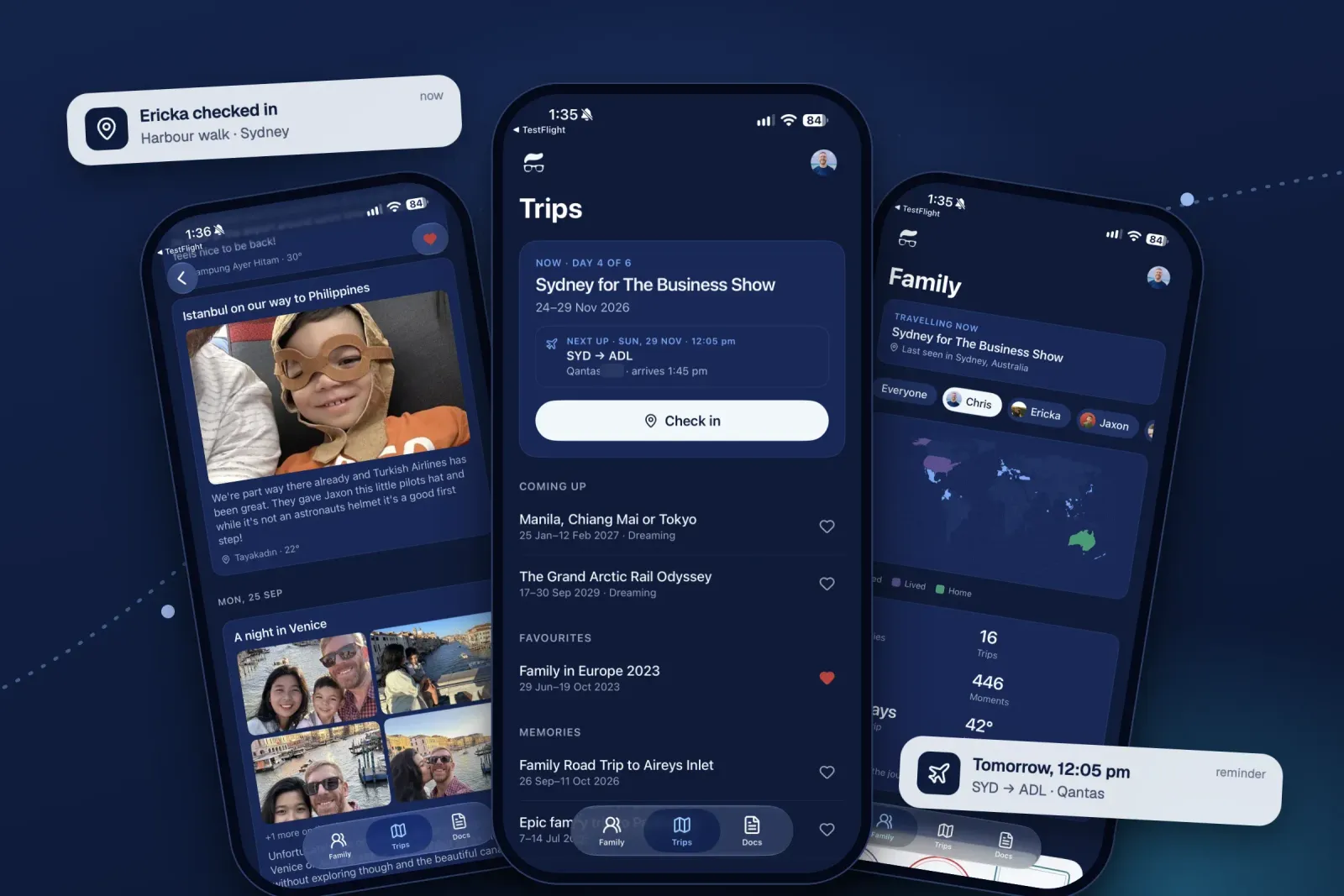
Trips. The home screen shows the trip we’re on right now, with what’s next (“Next up · Sun 29 Nov · 12:05 pm · SYD → ADL · Qantas”) and a big Check in button. Underneath are the trips coming up, our favourites, and the last few memories. Older trips are a search away, and anything we heart stays in Favourites.
Moments. Open a trip and the first tab is the journal: every check-in, newest first, with photos and who posted it. In the app it is live. Some trips on the website have a delay before moments appear publicly. The family sees them straight away. At the top are the trip’s stats and a map of every moment, and each moment shows the weather where and when it happened.
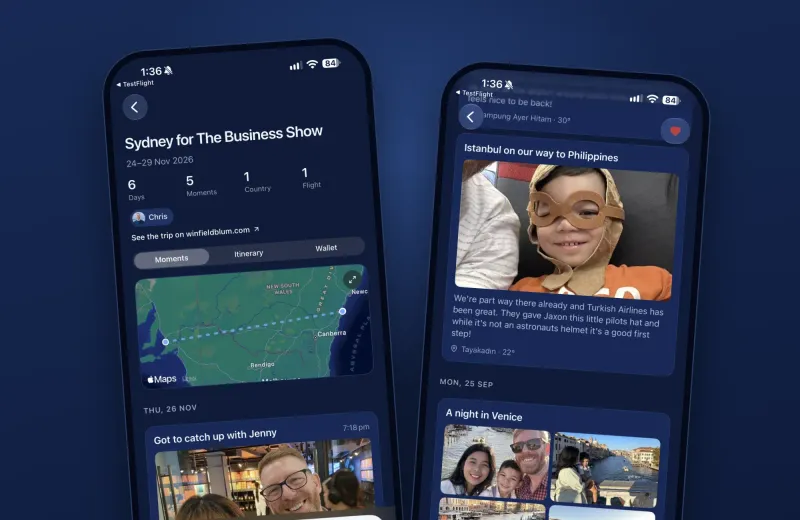
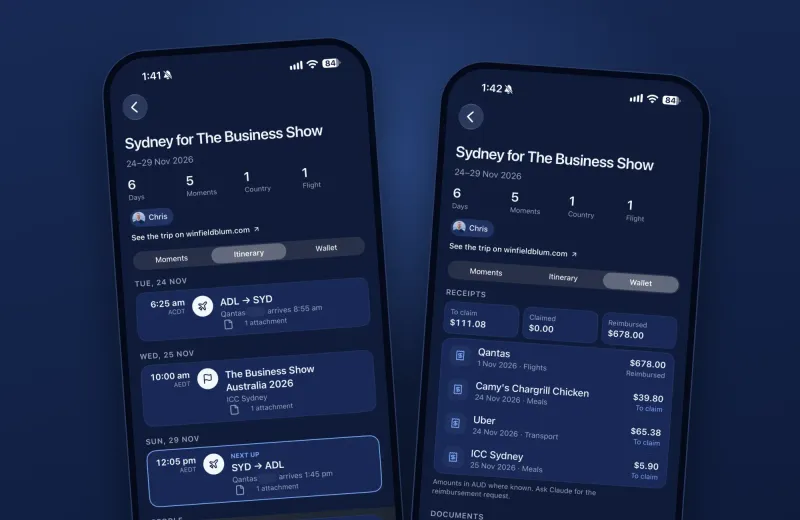
Itinerary. The second tab is the trip day by day: flights with their layovers, hotel check-in and check-out, tours, trains and transfers, and the stops from the plan. The next one is highlighted. Tap a row for the details: the booking reference to copy, the terminal and seat, the address, buttons for Google Maps and Waze, and the ticket itself.
Wallet. The third tab is everything you might need to show someone or claim back: the trip’s documents, every booking confirmation, and the receipts, with totals for what’s still to claim, what’s claimed and what’s been reimbursed.
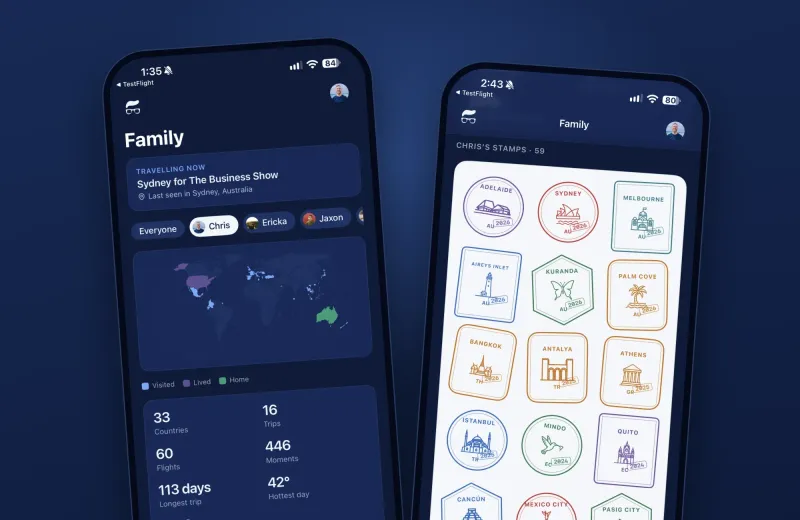
Family. The Family tab is all of us: who’s travelling now, a world map of everywhere we’ve been, and our stats (countries, trips, flights, even the hottest day), for everyone or just one of us. And because the boys love it, everyone has their own passport page of stamps, one for every city they have been to, the same as on their page on this site.
It follows the phone’s light or dark mode, in this site’s colours. In dark mode it is all navy.
How a trip works now
The best way to explain it is to follow a trip from the first booking to the last receipt.
Planning. It starts on my laptop. I draft the trip with Claude: where we might go, the order of the stops, how to get between them. The plan goes on the trip, and when we leave, its stops become planned moments that only appear on the site once we have actually been there.
Booking. When a confirmation arrives, I forward it to a travel bot that reads it, works out which trip it belongs to, and files it: the full booking privately, and a planned stop on the trip. A receipt gets a question first (“Uber, AUD 48.20, Sydney Airport to the hotel. Add to the trip?”) and is filed for claiming. Everyone with the app gets a notification for a new booking, and the itinerary updates within a couple of minutes.
On the road. This is where the app earns its place. Tap Check in and it already knows where you are. You can pin a different spot on the map or search for a place, change the time if it happened earlier, add a title, a note and some photos. When you add the first photo it checks where and when it was taken, and if that’s somewhere or sometime else it asks whether to use the photo’s place and time instead. Post it, and the card appears straight away with a little status that moves through Uploading, Syncing, Pending and then LIVE once it’s on the website.
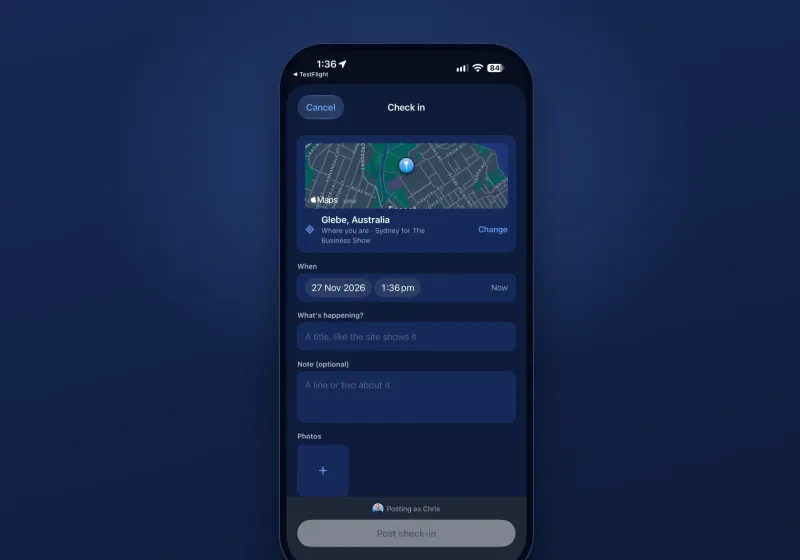
Behind the scenes, a Claude Code routine wakes up, writes the moment properly (looking at every photo to describe it, in the voice of whoever posted it), and publishes it. If it can’t place something, say there’s no location, it doesn’t guess. It holds it and tells me.
Made a typo? Swipe left on a moment to edit it or delete it.
Reminders. The app knows the itinerary, so it reminds you before the things that matter: the day before a flight and again four hours before, with the terminal, and an hour before a tour or a transfer. Everyone can change the timings, or turn them off.
After the trip. Snap a receipt from the Wallet tab with a note (“dinner with the team, claim it”) and it’s filed with the trip’s expenses. When I’m ready, Claude writes up the reimbursement request from them. And everyone’s stamps have quietly updated.
Secure documents
The part I was most careful with is the documents: passports, licences, visas and insurance.
They live in a private storage bucket that nothing public can read. The app never holds a key to it. Instead it asks a small piece of code that sits between the app and everything else (a Cloudflare Worker), which checks who is asking first.
On the phone, the Docs tab is behind Face ID. Each document is saved on the phone so it opens at a border desk with no signal, and is encrypted while the phone is locked. A passport number stays hidden until you tap it. There’s a “Show full screen” button that turns the brightness up for handing the phone across a counter. And none of it ever goes near the website.
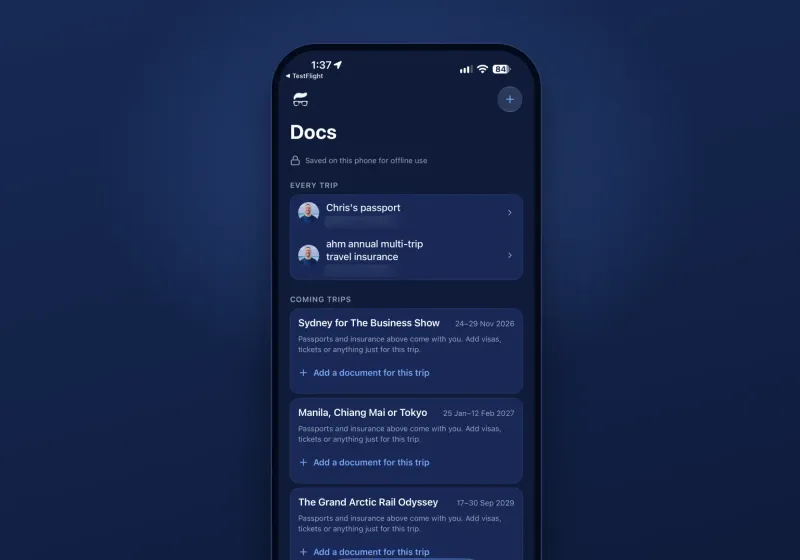
In our family everyone with the app can see everyone’s documents. That was a deliberate choice: when we travel together, whoever is at the desk can pull up any of our passports.
Inviting the family
I didn’t want accounts and passwords. Each person gets their own invite code, which I send to them. They open the app, type it in, and they’re in. The app swaps the code for a token it keeps in the phone’s keychain, and never sees a password or a key.
Everything they post is theirs. Their check-ins show as “By Ericka” on the site, count towards their own stats and stamps, and send a notification to the rest of us (“Ericka checked in · Harbour walk”). Family who aren’t travellers on the site, like my sister Amanda, can join as guests.
If a phone is lost, one command signs that person out everywhere, and a new code gets them back in.
The tech stack
For anyone who builds things, here is how it fits together.
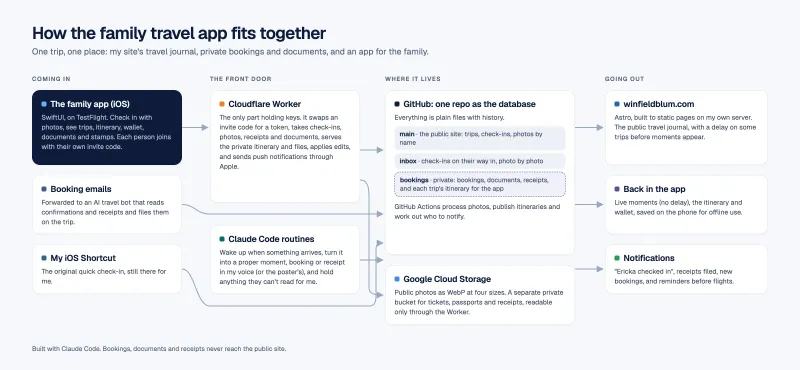
- The app is native SwiftUI, with Lucide icons and the site’s colours. It goes to the family through TestFlight, and Xcode Cloud builds and ships a new version every time I change it.
- A Cloudflare Worker is the front door, and the only part that holds any keys. It handles the invite codes, takes check-ins, photos, receipts and documents, serves the private itinerary and files, applies edits, and sends push notifications through Apple.
- One GitHub repository is the database. Everything is plain files with a full history. The public journal is on
main, check-ins on their way in wait oninbox, and the private bookings, documents, receipts and each trip’s itinerary for the app live on abookingsbranch that is never published. - Google Cloud Storage holds the photos (as WebP, at four sizes) and, separately, a private bucket for tickets, passports and receipts.
- GitHub Actions do the background work: putting photos in storage, rebuilding each trip’s itinerary when anything changes, and working out who to notify.
- Claude Code routines do the thinking: turning a check-in into a proper moment, filing a booking or a receipt from a photo and a note, and holding anything they can’t read with confidence.
- The website is Astro, built to static pages on my own server.
There is no traditional database and no server of my own for the app. It is files, a Worker and a few automations, and it costs very little to run.
I built it with Claude Code, over a couple of days. A year ago this would have been a big project. This time most of my effort went into deciding how it should work for us. Who should see what, what happens when the hotel wifi drops halfway through an upload, how to make sure a family photo never lands in the wrong place.
What I gave up
It isn’t all upside, and it’s worth being honest about that.
TripIt reads almost any booking email from almost any airline, and has years of edge cases behind it. My travel bot is good, but it is young. FindPenguins has a lovely community and beautiful printed books. Ours is just us.
TestFlight builds also expire after 90 days, so the app needs a fresh build now and then (Xcode Cloud takes care of that whenever I change something). And I’m the one who keeps it running. That’s a trade I’m happy to make for our family. It wouldn’t be for everyone.
What’s next
For now, it’s ours: me, Ericka and the boys, and the family we invite.
I have thought about opening it up. The pieces that would need to change are mostly at the back: sign-ups instead of invite codes, and each family’s data kept apart instead of everything in my repository. Maybe one day. For now I’m enjoying an app that does exactly what we need, with our data where I can see it.
If you’re a TripIt or FindPenguins user, keep using them. They’re great. But if you have ever wished your travel lived somewhere you control, it’s more within reach than it has ever been.